AI agents
Hire AI for the repeatable work. It can never touch the money.
Eight built-in automations ship today, you can write your own, and an AI assistant drafts guest replies from your property's facts. Each one is a rule you configure, an action you can audit, and a limit you can trust: no agent moves money, and no money-moving rule can even be written. Need something else? Request it from inside the Agent Hub.
Rules, not vibes
Agents you configure like staff, not prompts you hope will behave.
A Stay n Host automation is a deterministic rule with a schedule, conditions, and an audit trail: what it sends is exactly what the rule says, every single time. The Agent Hub keeps them on tabs (Built-in, Your automations, Auto-responses, Coming soon, Run history), and each built-in starts from a preset. You write the rule once; the system executes it on time, every night, without being reminded.
On our own production portfolio, August 2026, the agents carry the overnight work: the ops report, the digests, and the door codes all go out while the humans sleep.
How agent rules work →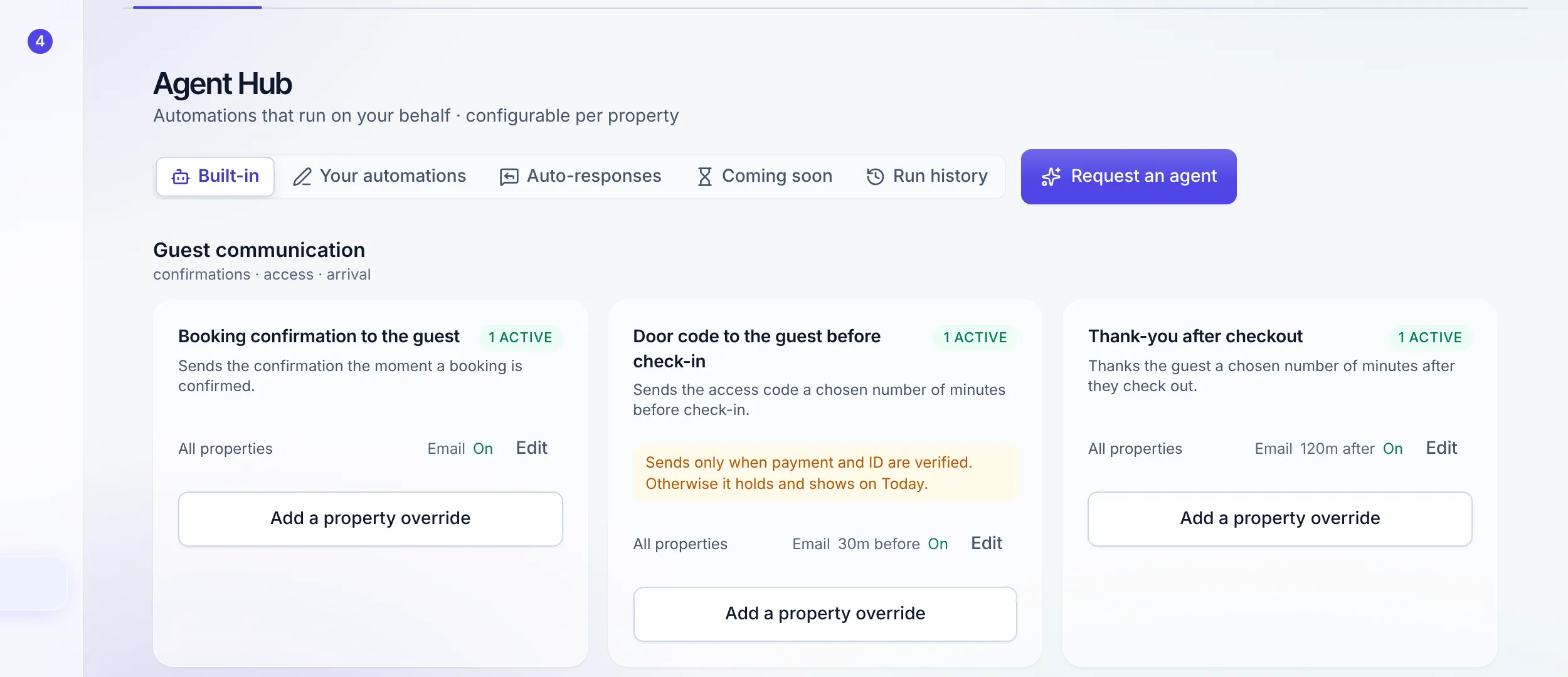
Shipped, not promised
The eight built-ins working today.
Booking confirmation
The moment a booking confirms, the guest hears it from you, by email or on your own WhatsApp number.
Door code before check-in
Sends ahead of arrival, and only when payment and ID are both verified, re-checked at the moment of sending. A blocked send is held with its reason, and goes the moment the last blocker clears.
Thank-you after checkout
The guest who just left hears from you once, after checkout, while the stay is still fresh.
Unpaid-quote reminder
A guest holding a quote they have not paid gets one reminder before the hold on the dates runs out.
Daily arrivals digest
Reception starts every day with the full arrivals list, per apartment, before the first guest rings.
Same-day arrival alert
A booking that lands for tonight pings the team immediately, so a last-minute guest never surprises the desk.
Nightly ops report
At 00:00 the day's numbers arrive in the team's WhatsApp. Yesterday is settled before today begins.
AI replies to guest questions
With the AI add-on, guest-app questions the assistant can answer from your facts are answered above the confidence you set. Everything else waits for a person.
What you can author yourself
The rules are yours to shape, inside the limit that is not.
Conditions on a rule
A rule can be narrowed to the cases it is for: this property, this channel, this length of stay. A condition is checked by the engine, not described in a note beside it.
Your own automations
A step-by-step composer for messages on booking confirmed, before check-in, during the stay, before check-out and after check-out, with a preview of exactly what the guest receives and every message drawn as a rail on the stay.
Auto-responses
When nobody is at the desk, a guest gets an answer that says so and says when. Silence at 2am is what loses a direct booking.
Tokens with real values
Messages carry tokens drawn from property knowledge, money and identity, and the composer inserts the value rather than the token, so what you approve is what sends.
Request an agent
The next agent is the one you ask for.
The built-ins cover the common work and your own automations cover messages on a booking moment, so when your operation needs something neither can express, you ask for it from inside the product. "Request an agent" sits at the top right of the Agent Hub: a name, what it should do, and a screenshot if that says it faster.
Anyone on the hub can ask
Not only the seats that configure rules. Reception and the front desk see the missing automation first, so they can file it themselves.
We know who asked
Your seat, your workspace and the page you asked from travel with the request, so the answer comes back to the right person.
It is read and triaged
Every request lands on a board and gets a lane: reviewing, planned, shipped or declined. A declined ask still gets a reason.
Nothing fires until it ships
A request is an ask, not a rule. It sends nothing, appears in no run history, and reaches the hub only as a real agent you configure.
The dual gate
What stops a door code reaching an unpaid guest?
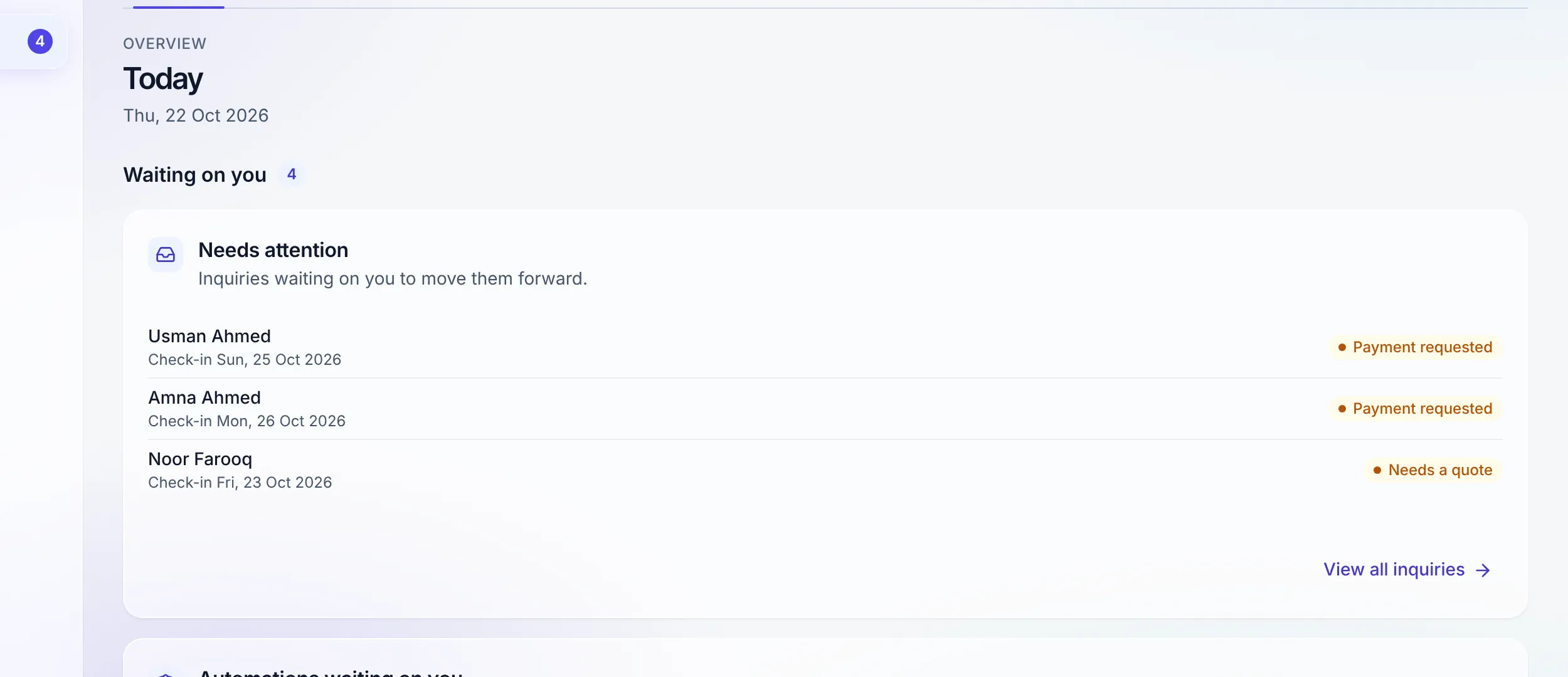
Two verifications, checked at the moment of sending, not when the rule was written. Payment verified and ID verified, both, or the code does not move. A blocked send is not an error that vanishes: it is recorded as held with its reason and surfaces on the Today dashboard as a work item. The agent keeps re-checking, and the moment the blocker clears, the code goes out by itself. No human step, no forgotten guest.
"An agent you can trust is one that provably cannot move money."
The AI assistant
AI that answers from your facts, and knows what it must not answer.
AI guest replies is an add-on, priced per AI unit on the pricing page; no plan includes it. The guardrails are the product.
Draft reply in the inbox
One click drafts an answer in the guest's language from the stay and the property's facts. You edit it and send it; nothing goes without you.
A per-property assistant
Tell it what it knows, its tone, your standing rules, your own facts and your discount policy, per property. If the facts do not cover a question, it says a person will reply rather than guessing.
A guarded autopilot
Switch it on and it answers guest-app questions by itself, only above the confidence you set. A question it cannot answer stays in the inbox for your team.
Always a person
Money, refunds, discounts, cancellations, complaints and door codes always wait for a person, whatever the model's confidence. Door codes and Wi-Fi passwords are removed before anything reaches the model.
The hard limit
Trust comes from what an agent cannot do.
No agent can move money, and no money-moving rule can even be written: the rule language cannot express it. Sensitive actions keep their human approval gates.
Receipts
"The guest says they got nothing." Run history answers in seconds.
Open the rule's run history and read it like a ledger: every send, every hold, every reason, timestamped. Either the message went out, and you can say exactly when, or it was held, and you can say exactly why. The conversation ends with facts instead of apologies.
FAQ
Agent questions
What can Stay n Host agents actually do today?
Eight built-in automations ship today: a booking confirmation to the guest, a door code before check-in, a thank-you after checkout, an unpaid-quote reminder, a daily arrivals digest to reception, a same-day arrival alert, the nightly ops report at 00:00 on WhatsApp, and AI replies to guest questions (with the AI add-on). Each is a rule you configure once; the system then executes it on time, every time. Your own automations sit beside them, built in a step-by-step composer.
Can an agent send a door code to a guest who has not paid?
No. The door code releases only when payment and ID are both verified, and both checks run again at the moment of sending, not when the rule was written. An unpaid or unverified guest gets nothing, and you get a held record explaining why.
What happens when a send is blocked?
It is recorded as held with its reason and surfaces on the Today dashboard, so a blocked code is a visible work item, not a silent failure. The agent keeps re-checking, and the moment the blocker clears, the code sends itself with no further human step.
Can agents move money, refund, or charge a guest?
No, and this is a hard product limit, not a setting: no agent can move money, and no money-moving rule can even be written. Sensitive actions keep their human approval gates. That limit is exactly why you can trust the rest.
Do the agents write AI replies to my guests?
Only if you add AI guest replies, and then only inside guardrails. The rule-based automations send exactly what you configured, verbatim. The AI add-on drafts a reply in the inbox for you to edit and send, and its optional autopilot answers guest-app questions on its own only when its confidence clears the threshold you set. It answers only from the facts you gave the property assistant. Money, refunds, discounts, cancellations, complaints and door codes always wait for a person, and door codes and Wi-Fi passwords are removed before anything reaches the model.
What if the automation I need is not one of these?
Write it yourself in Your automations if it is a message on a booking moment. If it is something else, ask for it in the product. "Request an agent" sits at the top right of the Agent Hub: give it a name, describe what it should do, attach a screenshot of the workflow if that helps, and send it. Every seat that can open the hub can ask, not only the ones who configure rules, and each request is read and triaged rather than dropped in a mailbox. A request fires nothing by itself; it reaches the hub only once it ships as a real agent you configure.
How do I audit what an agent did?
Open the Run history tab: every send, every hold, every reason, timestamped, with a resend for a delivered run that never re-sends a door code. Underneath, every automated action writes an audit row with actor "system" and the id of the rule that fired, so "who did this and why" always has an answer.
Try the whole platform free for 14 days
Full Growth-plan access. No credit card. Your data stays yours.
Start free trial