AI assistant
It drafts the reply. It knows which ones are not its to send.
The AI assistant writes replies to guest messages from what your records already say. You read, edit and send. Turn on autopilot and it answers the routine questions by itself, while anything about money, refunds, discounts, cancellations, complaints or door codes waits for a person, every time.
Three ways to use it
From a single draft to a guarded autopilot.
Draft reply, in the inbox
Press Draft reply on a conversation. The draft lands in the composer for you to read, edit and send. If it touches a sensitive topic, it says so: "This one needs you".
A per-property assistant
The AI assistant page shows what it already knows about a property, what guests ask that nothing answers yet, and lets you set its tone and standing rules.
Autopilot for routine questions
Per property, answer automatically when the assistant is at least as sure as your threshold. Everything else waits for you on Home.
Every action on the record
Each automatic reply and each hold is in the Agent Hub run history, with the reason a message was held.
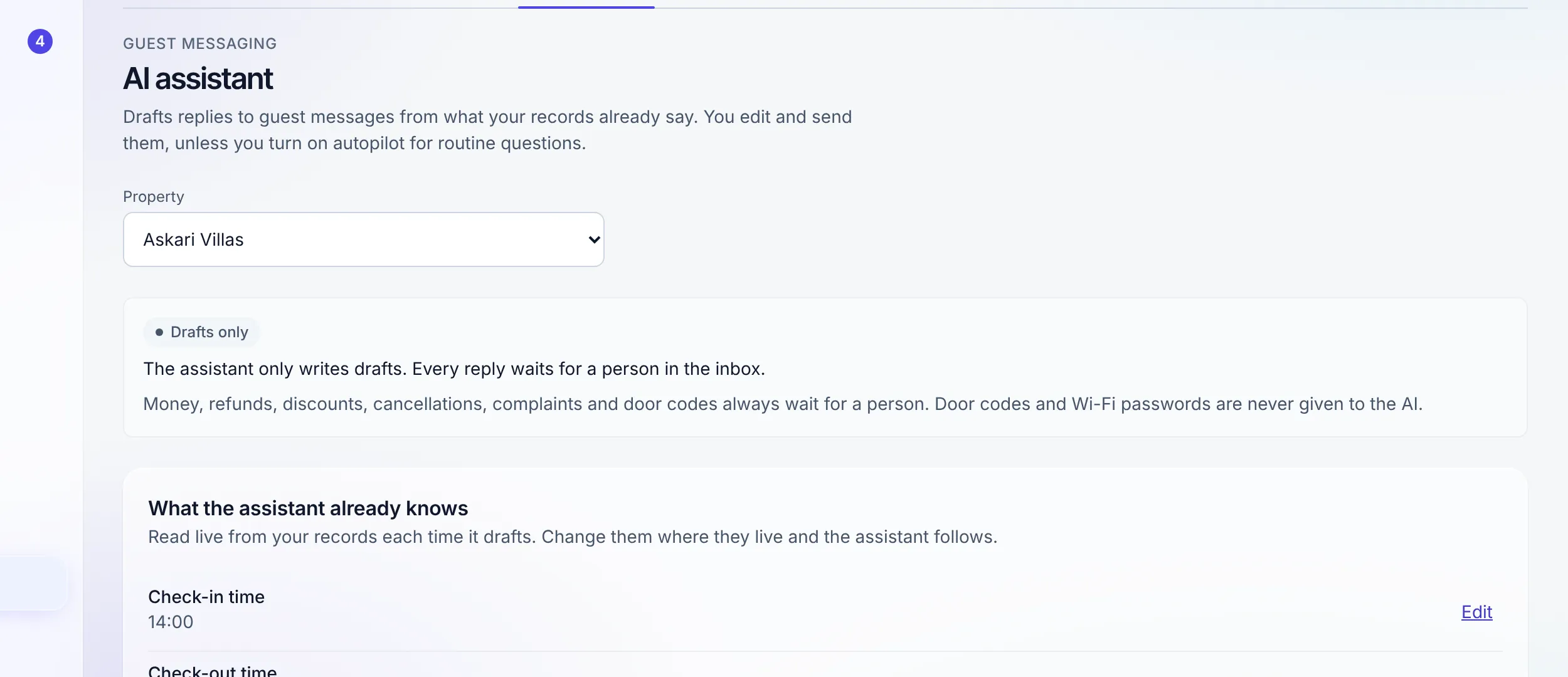
What it knows
Your records, read live. Not a copy that goes stale.
The assistant reads the property’s content and policies, unit types, guest-app pages and fees each time it drafts, along with the booking in question and real availability around the stay. Change a record where it lives and the next draft follows.
On top of that you add your own: a tone (Warm, Friendly, Professional, or Short and to the point), standing rules it always follows, up to 40 question-and-answer facts, the optional extras it may offer at their catalogue prices, and, only if you switch it on, your discount policy for drafts to mention. It never invents a price.
What it never gets
Door codes and Wi-Fi passwords stay out of the model.
Before anything is sent to the model, door codes and Wi-Fi passwords are removed: the exact codes on the booking, and anything that looks like a code or password typed into free text. The finished prompt is scrubbed a second time. The assistant still knows a code exists, so it can tell the guest a person will send it.
Door codes reach a guest only through the payment and ID gate, never through a chat reply.
How door codes are released →The autopilot’s guard rails
It holds by default. Sending has to be earned.
Human-only topics
Money, refunds, discounts, cancellations, complaints and door codes are never sent automatically. A keyword check over the guest’s message and the draft backs up the model’s own judgement, and can only add a topic, never remove one.
Your confidence threshold
Choose from 50% to 100% per property; 85% is the default. Below it, or when the records do not answer the question, the message waits for you.
Guest-app conversations
Autopilot replies inside the guest app’s conversation, marked as the AI assistant. A conversation it cannot reply on is held for a person, never answered somewhere else.
Turning it on is a permission
Only an admin changes the assistant, and switching autopilot on needs the Agent Hub permission too. No AI in Stay n Host moves money or releases a door code.
What agents can and cannot do →AI elsewhere in the product
Two more places it helps, both on the record.
Ask AI, for your team
A button inside the app answers "how do I" questions from the Stay n Host help centre, links the screen to go to, and says so when the docs do not cover something rather than guessing. On every plan.
Browse the help centre →Your booking site, translated
Your own words on the booking site are translated into its languages within minutes of a save. Correct any of them by hand and the automatic translation never overwrites yours. Part of the booking site, not the AI add-on.
Languages and currencies →"A confident wrong answer about a refund costs more than a slow right one."
Honest limits: the assistant answers from your records, so a property with thin content gets thin drafts (the page lists what is worth adding). Autopilot holds messages in non-Latin scripts. It does not book, quote, discount, refund or cancel. AI messaging is an add-on; no plan includes it.
FAQ
AI assistant questions
What does the AI assistant actually do?
It drafts a reply to a guest message from what your records already say: the property’s content and policies, unit types, guest-app information, the booking itself, real availability around the stay, and the facts you add. In the inbox you press Draft reply, read it, edit it and send it. With autopilot on, it can also answer routine questions by itself.
What will it never answer on its own?
Money, refunds, discounts, cancellations, complaints and door codes always wait for a person. The model labels the topic, and a keyword check over both the guest’s message and the draft adds any of those topics the model missed. It can only add a human-only topic, never remove one, so a guest cannot talk it out of the rule.
Does the AI ever see my door codes or Wi-Fi passwords?
No. Door codes and Wi-Fi passwords are removed from everything before it is sent to the model, and removed again from the finished prompt. If a draft still contains something that looks like a secret, autopilot holds it for a person.
Where does autopilot reply?
Inside the guest’s conversation in your inbox, marked as the AI assistant so nobody mistakes it for a colleague. It answers conversations from the guest app. A conversation it cannot reply on is held for a person rather than answered somewhere else.
How confident does it have to be?
You choose, from 50% to 100%, per property. The default is 85%. Below your threshold, or when it cannot answer from your records, the message waits for you under Waiting on you on Home. Every reply and every hold is in the Agent Hub run history.
Which plan includes it?
None. AI messaging is an add-on on any plan, at $10 a month per AI unit. Without it you can look around the AI assistant page, but drafts and autopilot stay off. Ask AI, which answers questions about using Stay n Host from the help centre, is on every plan.
Does it work in my guests’ languages?
Drafts can be written for any guest, and you check every word before you send. Autopilot is stricter: its keyword safety check reads Latin script only, so a message in Arabic, Urdu or Chinese script is held for a person instead of sent.
Check us
Ask your AI about our AI.
Try the whole platform free for 14 days
Full Growth-plan access. No credit card. Your data stays yours.
Start free trial