Channel manager
Six channels, one calendar, and the money recorded the way it was paid.
Connect Airbnb, Booking.com, Expedia, Agoda, Vrbo and Google Vacation Rentals from one Channels page. Availability and prices go out on their own within about a minute, bookings come back on their own, and every channel booking lands in the books with the channel’s own figures: who collected, what the channel kept, what it owes you.
The channels
What each one does, and who holds the money.
Airbnb
Availability, nightly prices, stay rules, bookings, changes, cancellations, guest messages and reviews. Airbnb always collects the guest’s payment and pays you out, and it always sells your standard rate plan.
Booking.com
Bookings, changes and cancellations arrive on their own. Booking.com defaults to "You collect": the stay arrives with the whole amount due from the guest. Change the default, and a booking that says who collected it always wins.
Expedia
Connected and mapped the same way as Airbnb. Defaults to the channel collecting, so the stay arrives paid and the payout is owed to you until you record it arriving.
Agoda
The same connect and map flow, the same who-collects choice, the same "What you earned" card on every booking it sends.
Vrbo
Bookings, changes and cancellations, money recorded exactly as Vrbo reports it, reviews into the Reviews page.
Google Vacation Rentals
Google does not take the booking itself: it sends the guest to your own booking site, so the stay arrives as a direct booking. A readiness check names anything Google will refuse, such as fewer than eight photos.
All six connect through Channex, the channel manager underneath. Each property can use its own account on each channel.Airbnb in depth →
Who collects
A channel booking is money. It is recorded as money.
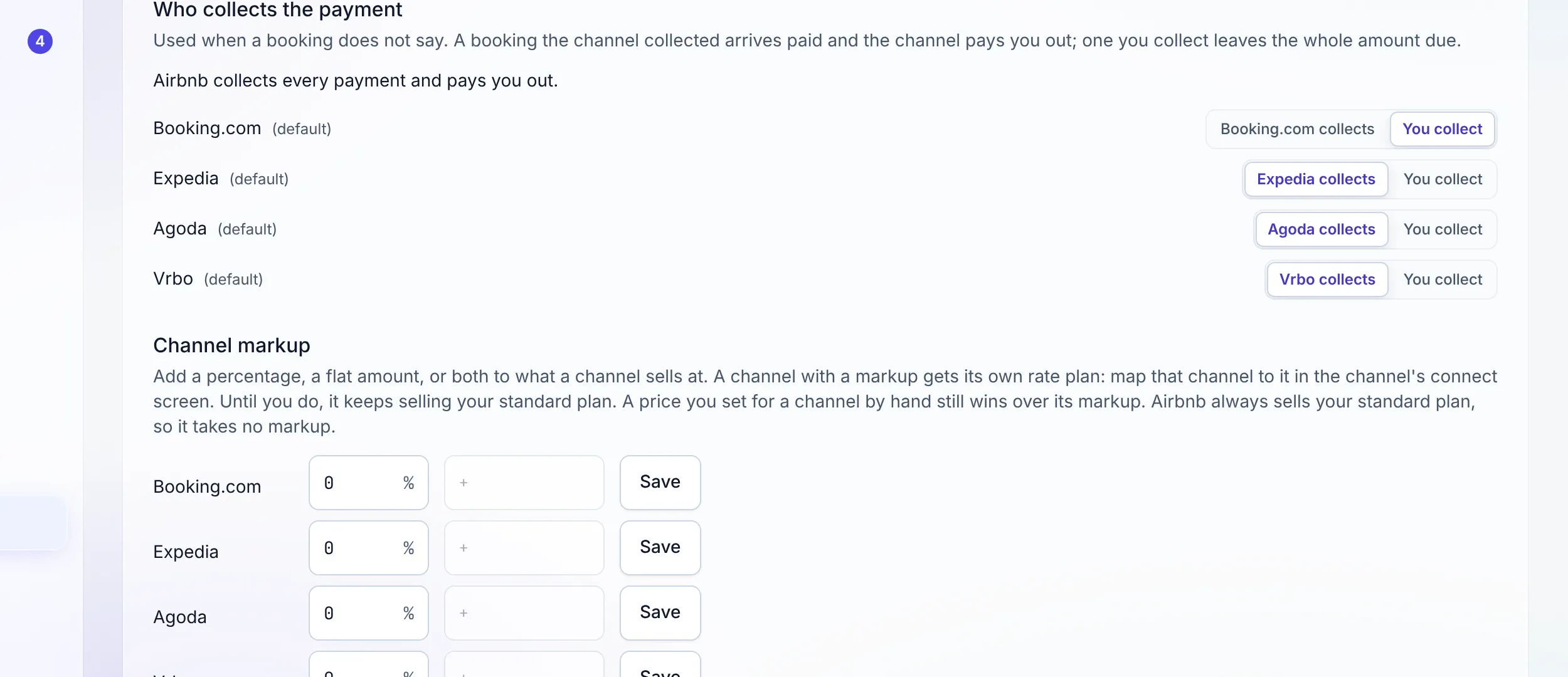
Under Who collects the payment, choose for each channel what happens when a booking does not say. A stay the channel collected arrives paid, and the payout it owes you waits in Finance until you record it arriving. A stay you collect arrives with the whole amount due, and you take it at check-in like any other booking.
Every channel booking carries a What you earned card: the booking value, the channel’s fee, and what the channel pays you. The figures are the channel’s own. When a channel does not report its fee, the card says Not reported rather than guessing.
How payouts reach the treasury →The channel’s fee
On a stay you collect, the fee is a bill.
When you collect, the channel invoices you for its commission. Stay n Host records that fee as a bill to the channel the moment the booking arrives, so it is already in Bills to pay and never gets entered twice.
Who bears it follows the operating model: a Channel Fees cost on a unit you own or lease, a cost passed through to the owner on a unit you manage, and the investor pool’s on an investor unit. A managed owner’s gross stays owner money, so a fee on their stay never inflates your costs.
How the five models differ →Prices on the channels
Who sets the price, channel by channel.
Channel markup
A percentage, a flat amount per night, or both, for Booking.com, Expedia, Agoda or Vrbo. The channel gets its own rate plan per room type; map it once on the channel’s connect screen. A price you set for a channel by hand still wins.
Airbnb takes no markup
Airbnb always sells your standard plan, so your live Airbnb listings never need re-mapping onto a new one. That is a deliberate choice, not a missing field.
A 30-night preview
Pick a unit under the markup and see the next 30 nights, one column per channel, showing exactly what each channel will sell it at.
Your pricing tool can own the price
Set "Who prices" to My pricing tool for a unit PriceLabs, Wheelhouse, Beyond or RoomPriceGenie prices. We send its availability and stay rules, and no price, so the two never fight.
Price rules, if you want them
Weekend, season, long-stay and occupancy rules can send their adjusted price to your channels. That switch is off until you turn it on.
Price rules →The currency guests see
Choose per property the currency a channel shows guests. Airbnb lists in US dollars. Your direct nightly rates stay in your own currency, unchanged.
Sync controls
It runs by itself. You can still push it.
Send changes now
Changes go out within about a minute anyway. This sends them at once and says how many connections were updated.
Re-send everything (500 days)
Queues the whole calendar again, for the day a channel shows a price or availability that differs from yours.
Seasonal pause
Pause selling on a property, or every property. Connections stay, existing bookings still get their changes, and Resume brings back exactly what you paused.
Hold units back
Sell individual units or pool them by type, take one unit off a channel, or keep a few units back from the marketplaces.
The human gate
Routine events apply themselves. Risky ones wait.
A new booking or an ordinary change applies on its own. Anything that changes money, collides with another booking, or cancels a stay is held on Channel bookings to review under Reservations, with the reason in plain words: a guest cancelled (the nights are released, the refund is yours to make), the channel changed what a stay pays or who collects it, the new dates collide, there is no exchange rate for today.
Fix the cause, press Retry, and the row moves to Applied. A retry that fails says so. The queue never pretends to be empty when it simply could not be read.
Working the review queue →Messages and reviews
The guest’s channel conversation, in your inbox.
Guest messages from channels that offer messaging land in the shared Inbox beside your other conversations, and a reply goes back on the channel the guest wrote on.
Reviews from the channels land on the Reviews page, where you can post your one public reply. On Airbnb you can also leave the host-to-guest review.
The shared inbox →"Connected to everything" is easy. Recorded correctly is the hard part.
Honest limits, October 2026: six channels, not hundreds. Airbnb takes no markup and lists in US dollars. Accepting or declining an Airbnb reservation request, and accepting an alteration, finish on Airbnb itself. Booking.com virtual cards are not captured, because Stay n Host takes no card payments. Calendars from other tools cannot be imported by iCal; each listing offers an iCal export feed instead.
FAQ
Channel manager questions
Which channels can I connect?
Airbnb, Booking.com, Expedia, Agoda and Vrbo, which send bookings, and Google Vacation Rentals, which sends guests to your own booking site. They connect through Channex, the channel manager underneath, from the Channels page. Other channels are not offered.
Which plan do I need?
Channel sync starts on Starter, which covers two channels. Growth, Operator and Enterprise cover every channel. Solo has no channel sync. Google Vacation Rentals also needs a published booking site, which is part of Operator or the $32 a month direct-booking add-on, because Google sends guests there.
Who collects the payment on a channel booking?
You choose per channel what happens when a booking does not say. If the channel collects, the stay arrives paid and the channel owes you the payout, which waits in Finance until you record it arriving. If you collect, the stay arrives with the whole amount due. Airbnb always collects. Booking.com defaults to "You collect"; Expedia, Agoda and Vrbo default to the channel collecting. A change applies to new bookings only.
What happens to the channel’s fee when I collect?
It is recorded as a bill to the channel the moment the booking arrives, so it is already in Bills to pay. On a unit you own or lease it is a Channel Fees cost; on a unit you manage for an owner the owner bears it; on an investor unit the pool bears it. A changed fee replaces the bill, a cancellation voids it, and a bill you already paid is never changed behind your back.
Can I charge more on one channel?
Yes, on Booking.com, Expedia, Agoda and Vrbo. Channel markup takes a percentage, a flat amount per night, or both, and gives that channel its own rate plan. A price you set for a channel by hand still wins over its markup. Airbnb takes no markup and always sells your standard plan, so live Airbnb listings never need re-mapping.
I use PriceLabs or Wheelhouse. Will Stay n Host overwrite their prices?
Not on a unit you hand to them. Set "Who prices" to "My pricing tool" and Stay n Host sends that unit’s availability and stay rules to its channels, and no price. Your tool keeps setting the price on the channel. This is a switch, not an integration: Stay n Host does not talk to the pricing tool.
What does not apply itself?
Anything that changes money, collides with another booking, or cancels a stay waits on Channel bookings to review: a guest cancellation (the nights are released, the refund is yours to make), a channel changing what a stay pays or who collects it, new dates that collide, a missing exchange rate. Routine bookings and changes apply themselves.
Can I stop selling for the off-season without disconnecting?
Yes. Pause selling on a property, or Pause every property, stops selling on every channel and keeps every connection. Existing bookings still receive their changes and cancellations. Resume selling brings back exactly what you paused.
Check us
Ask your AI about the channel manager.
Try the whole platform free for 14 days
Full Growth-plan access. No credit card. Your data stays yours.
Start free trial