Invoices and upsells
Every stay has one statement, and it never rewrites itself.
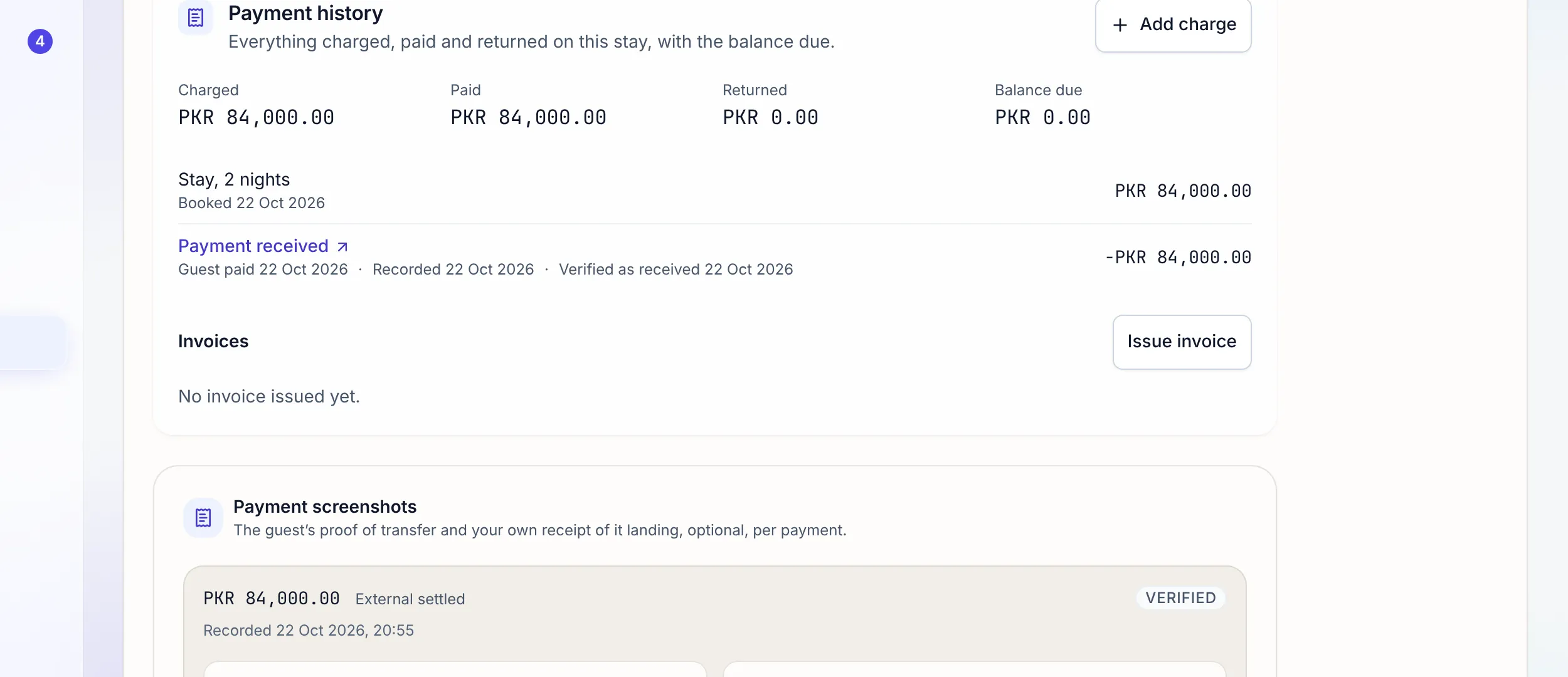
Each booking carries a payment history: what the stay was charged, what the guest paid, what was returned, and the balance due. Invoices come from it with gapless numbers on your letterhead, extras ordered in the guest app land on it, and a correction is a reversal you can read, never an edit.
Payment history
Five kinds of line, and a balance you can trust.
Stay
The booking’s total for its nights.
Extra or charge
A confirmed extra or a charge someone added. Due until a payment is recorded, then Paid.
Payment
Money received and verified, with its receipt number.
Allowance
Compensation you gave back while the price stands.
Money returned
A refund or a settlement paid back to the guest.
Add a charge, reverse it with a reason, or record that the guest paid it into the account the money reached. Recording a payment posts to your books.
Invoices and credit notes
Numbered without gaps. Printed on your letterhead.
Issue invoice freezes the stay’s charges as they are and gives it the next number in your workspace’s sequence. The PDF is drawn in the same letterhead as your quotations, with your logo. Download PDF, or Email to guestwith a link to their stay.
If the charges move after you invoiced, the button becomes Reissue invoice: a credit note cancels the old invoice in full and a new one replaces it. Nothing issued is ever changed.
Upsells
Extras the guest asks for, at prices you set.
Offer an optional fee in the guest app: early check-in, an airport transfer with Sedan and Van options, a late check-out. The guest asks from Extras and invoices, it appears under Waiting on you on Today, and you confirm or decline with a reason the guest sees.
The Upsell revenue section on the Charges page shows the total, a chart by month, the categories, the top extras and each sale. It counts paid extras only; one still owed is a balance due, not revenue yet.
Inside the guest app →Money going back
Refunds move on a decision, never on their own.
Request
On a cancelled or no-show booking, one action files how much and why. It cannot exceed what is refundable.
Decide
A seat with the approval permission pays or rejects it. Who requested and who decided are stamped separately.
Pay
Only Pay refund, confirmed, posts the money out. It shows on the payment history as money returned.
Prove
Attach the transfer evidence as Refund proof on the booking’s Payments tab, beside the guest’s own payment proofs.
"An invoice you can edit after the fact is not an invoice."
Honest limits: no card payments, payment links or deposits; an invoice records what is owed and a person records what was paid. The payment history shows one currency at a time and says how many lines in another currency it left out. No AI and no automation can pay a refund.
FAQ
Invoicing questions
What is the payment history on a booking?
One statement per stay, on the booking’s Payments tab: what it was charged, what the guest paid, what was returned, and the balance due. Nothing on it is ever edited or deleted. A mistake is corrected by a reversal, which keeps the original line, crossed through, beside the reversal and its reason.
Are the invoice numbers sequential?
Yes. Each workspace has its own gapless sequence: invoices like INV-000042 and credit notes like CN-000007, with no gaps and no repeats. Issued invoices and credit notes are never changed.
What if the charges change after I invoice?
The payment history says so and the button reads Reissue invoice. Reissuing writes a credit note that cancels the old invoice in full, then issues a new one. To cancel an invoice without a new one, for a cancelled stay or a mistake, credit it.
How does the guest get the invoice?
Download the PDF and send it however you like, or press Email to guest, which sends it with a link to their stay in the guest app. The guest can also download every invoice and credit note for their stay from Extras and invoices in the guest app.
Can guests pay by card?
No. Stay n Host takes no card payments, payment links or deposits. Guests pay the way they already do, by bank transfer, cash or a wallet, and a person on your team records and verifies it. The invoice says what is owed; it does not collect it.
How do extras work in the guest app?
Add an optional fee on Fees & Taxes and offer it in the guest app, with limits if you like: how many per stay, a cut-off before check-in, stay lengths, check-in dates, options with their own prices, a photo. The guest asks, you confirm or decline with a reason, and a confirmed extra lands as a balance due. The price is always worked out from your settings, never typed by the guest.
Which plan includes this?
Every plan. Payment history, invoices, credit notes, guest-app extras and refunds are part of the core product. The Upsell revenue report sits on the Charges page in Finance, for seats that can read the transaction ledger.
Check us
Ask your AI about invoicing.
Try the whole platform free for 14 days
Full Growth-plan access. No credit card. Your data stays yours.
Start free trial