Calendar and bookings
One grid for every unit. And an oversell that cannot happen.
Availability, holds, blocks and turnovers across the whole portfolio in a single view. Double bookings are not prevented by a careful process here. They are refused by the database, on every write, whichever channel the booking arrived from.
Read it at a glance
The strip tells you the whole story.
Each reservation draws as a strip across the nights it owns, labelled with the guest, the source it came from, and its status. The nightly price sits on the cell. Colour carries the booking source, so the channel mix of a month is something you see rather than something you calculate.
Month, week and day views share one filter set: property, listing type, status, source. Click any strip to open the booking itself, and press the keyboard shortcut to come straight back.
How to read the grid →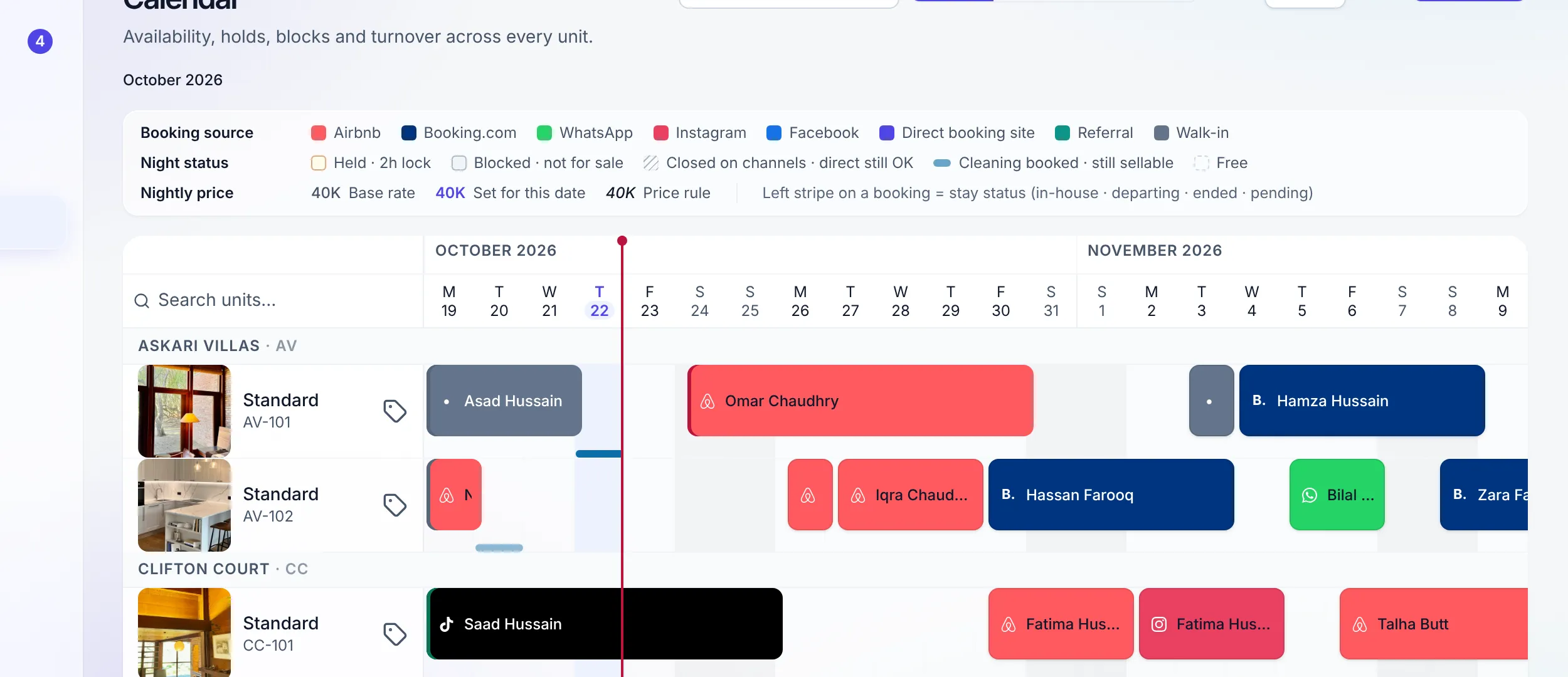
The booking record
Everything about a stay, on one page.
A booking is not a row in a list. Every reservation has one page of its own, reached from the Reservations list, with a lifecycle rail across the top. Open one and you get the guest, the nights, the money with every charge and payment, the messages exchanged, the ID check, the door code, the turnover, a Condition tab with the last turnover's photos and videos, and a history that names who changed what and when.
Extensions, early departures, cancellations and refunds all run from here, each posting to the ledger the moment it is agreed. An edit to a booking must state its reason, a duplicate entry can be deleted, and a stay entered late still gets its turnover.
Where the money goes →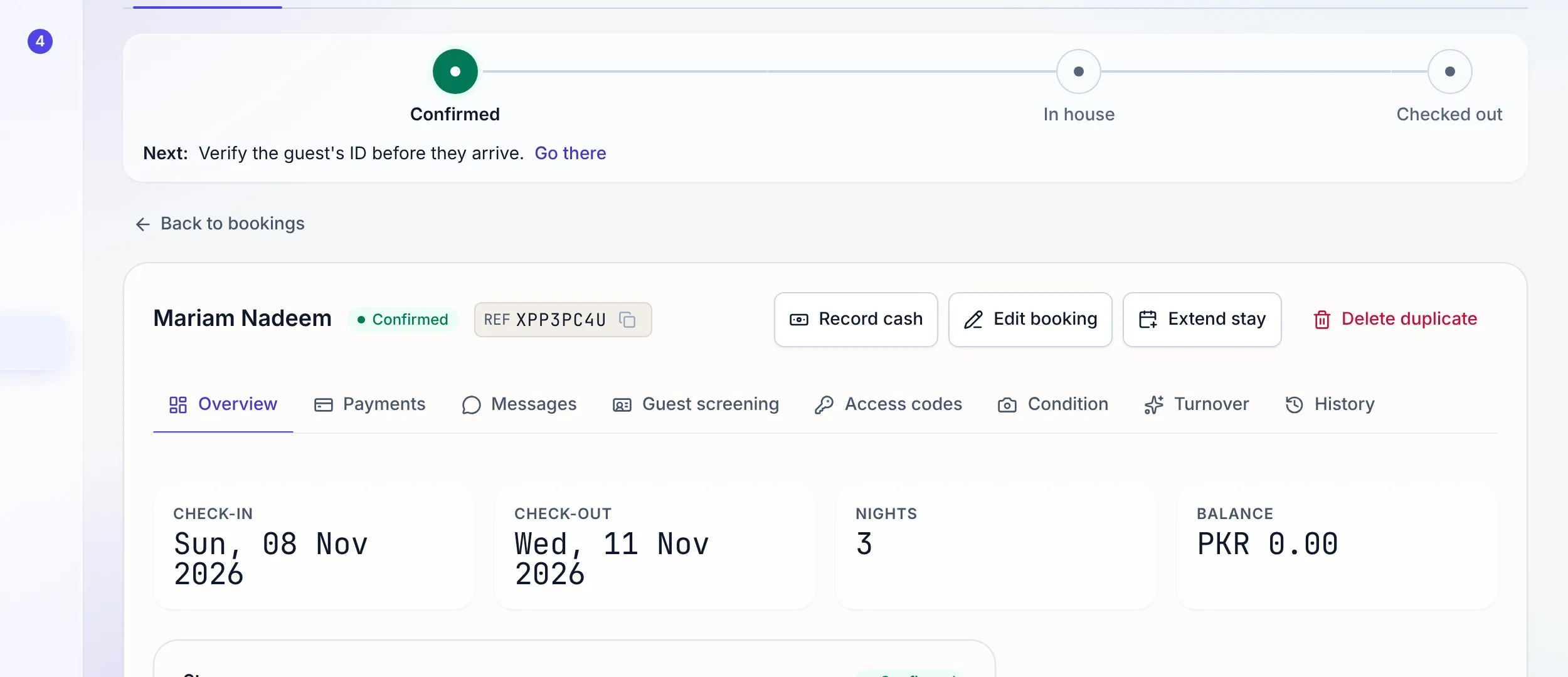
The parts that bite
Five things a simple calendar gets wrong.
The race between two channels
A channel booking and a direct booking can land in the same second. The uniqueness rule on listing and night means one of them fails cleanly and lands in the channel exceptions queue for a human, instead of both quietly succeeding.
How the sync handles it →The guest who is "transferring now"
A hold reserves the unit for a set window, default 120 minutes, from the moment a payment proof is recorded. It shows on the grid with its expiry, so nobody has to remember it, and nobody loses the room while the bank does its thing.
The house that is also three rooms
Linked units share one conflict set. Book the whole property and the rooms close; book a room and the whole-property listing closes. The calendar draws it on both sides so the block is visible, not implied.
The turnover that cannot happen in time
Prep time holds the gap a cleaner needs between a departure and the next arrival. The calendar stops selling the impossible night, and the turnover board picks the job up from the same dates.
See the turnover board →The group that took four apartments
One deal, one price, one guest to talk to, and still four apartments that each check in, clean and release their own door code on their own schedule. Cancel the deal and every unit frees at once; clear one apartment's blockers and only that apartment's code goes out.
"Every night on the grid is a row the database will only sell once."
An iCal feed publishes availability outward for anything you still keep elsewhere. Airbnb, Booking.com, Expedia, Agoda, Vrbo and Google Vacation Rentals connect properly, two ways, rather than through a calendar file.
FAQ
Calendar questions
How does the calendar make an oversell impossible?
A booked night is a row in the database with a uniqueness constraint on the pair of listing and night. Two bookings cannot claim the same night, because the second write is rejected by the database itself rather than by application code that might be racing with another request. It is not a check that runs before saving; it is a rule the data cannot break.
Can I hold dates while a guest is still deciding?
Yes. Recording a payment proof puts a hold on the unit for a configurable window, 120 minutes by default, so a guest who says they are transferring the money does not lose the room to somebody faster. Holds appear on the grid, show who placed them and when they expire, and can be released by hand at any time.
What about a duplex, or a whole house that also rents room by room?
Link the units. A parent listing and its children share a conflict set, so booking the whole house blocks each room and booking a room blocks the house. The calendar draws the block on both, and the same uniqueness rule that protects a single unit protects the set.
Does the calendar show money?
It shows the nightly price on the cell and the booking source on the strip, so you can read revenue and channel mix straight off the grid. You can edit a night’s price right in the cell, set the base rate from the row, and move around the grid with the keyboard; a night priced by a price rule shows in italics. Every change writes an audit row like any other.
Can I block dates for maintenance or my own stay?
Yes, with a reason. Blocks sit alongside bookings and holds on the same grid, carry the reason and the person who placed them, and push out to every connected channel on the next sync so no channel can sell a night you took off the market.
Is there prep time between stays?
Yes. Prep time reserves the gap a turnover needs, so the calendar stops offering a same-day arrival the cleaner cannot physically reach. It also feeds the turnover board, which is where the cleaner actually sees the job.
Try the whole platform free for 14 days
Full Growth-plan access. No credit card. Your data stays yours.
Start free trial