Price rules
Rules you write, applied exactly as written, previewed before you save.
Price rules raise or lower your nightly price when their conditions hold: weekend premiums, seasons, long-stay discounts, last-minute and early-bird prices, or a higher price as you fill up. Every rule shows its effect on the next 30 nights before you save it, and a floor and a ceiling stop any of them going too far.
Rule types
The rules operators actually use.
Weekend premium
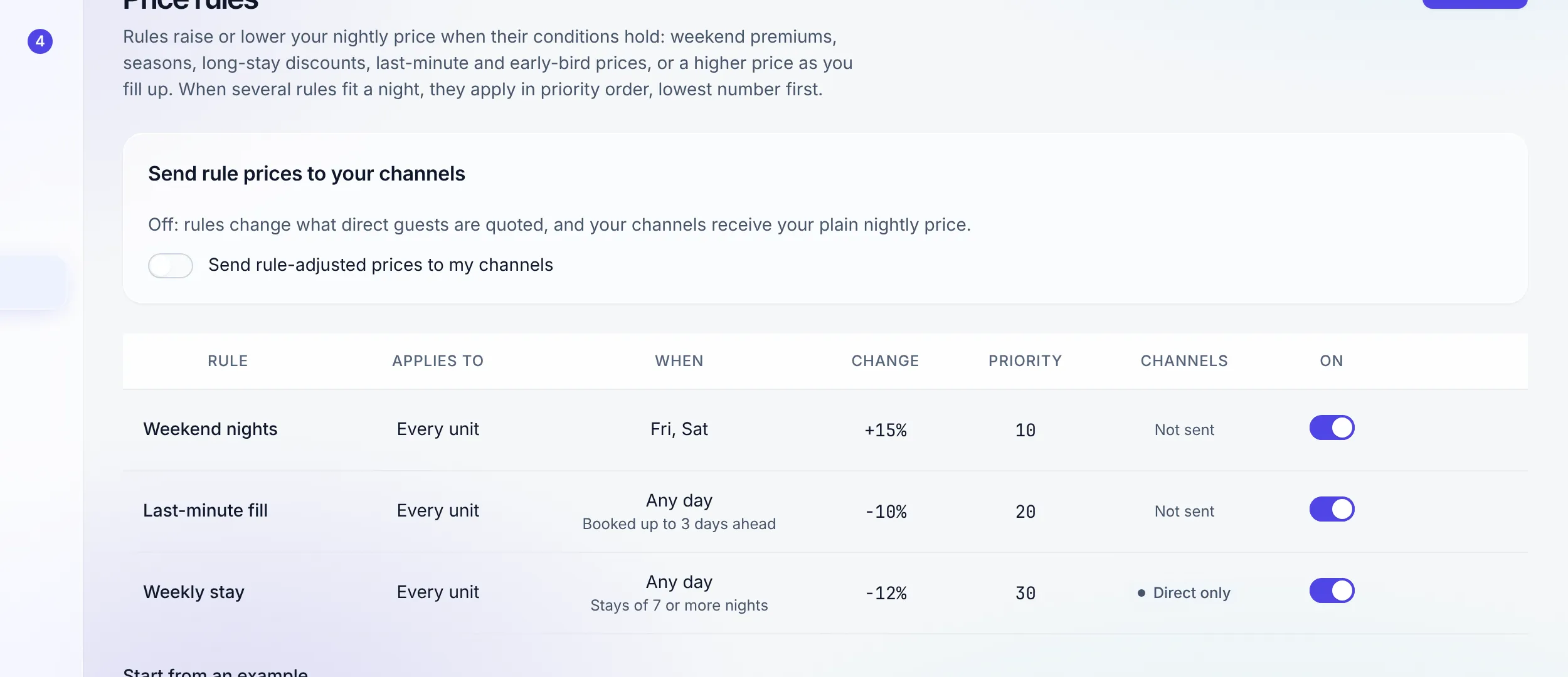
+15% on Friday and Saturday nights.
Season
Raise or lower nights between two dates, both included.
Long stay
10% off stays of 7 nights or more. Direct bookings only.
Last minute
10% off when booked 0 to 3 days ahead.
Early bird
5% off when booked 60 or more days ahead.
Filling up
+12% when 75% or more of the property is booked.
Five of these are one-click examples on an empty Price rules page. Each rule is scoped to every unit, one property, one unit type, or one unit, and switches on and off without being deleted.
Conditions
Every condition you fill in must hold.
A rule can name days of the week (a Friday night is the night from Friday to Saturday), nights between two dates, a stay length, how many days ahead it was booked, the occupancy of the property or unit type that night, and pace: more than a given share sold in the next so many days. Leave a pair empty to ignore it.
The change is a percentage, a flat amount per night, or both, in one direction. When several rules fit a night they apply in priority order, each to the price the last one left.
The preview
See what guests will pay, night by night.
Pick a unit and a stay length and the preview shows the next 30 nights: your own price, what a direct guest is quoted, and what your channels receive. It names the rules that fired, marks nights you set by hand, and flags any night a floor or ceiling stopped.
The same preview runs while you edit a rule, so you see "7 of 30 nights change" before anything does.
What stays in your hands
Rules never win against a decision you made.
Floors and ceilings
Set them per unit type or per property. A unit uses its type’s limits, else its property’s. A limit bounds what rules do and never touches a price you typed.
Hand-set prices are left alone
Nights you priced by hand on the calendar, and prices you set for one channel, are never changed by a rule.
Pricing on the calendar →Channels only when you say so
"Send rule-adjusted prices to my channels" is off by default. On, the channels receive the rule price per night; length-of-stay rules stay direct-only either way.
The channel manager →Or let your pricing tool own it
A unit set to "My pricing tool" on the Channels page gets availability and stay rules from Stay n Host and its price from PriceLabs, Wheelhouse, Beyond or RoomPriceGenie.
Scoped seats stay scoped
A seat limited to some properties can only write rules for those properties. A rule for every unit needs a seat that manages the whole workspace.
Roles and seats →"A rule you can read beats a black box you have to trust."
Honest limits: this is a rules engine. It has no market data, competitor rates or price recommendations, and it does not connect to PriceLabs, Wheelhouse, Beyond or RoomPriceGenie; it steps aside for them unit by unit instead. Length-of-stay discounts apply to direct bookings only.
FAQ
Price rules questions
Is this dynamic pricing?
It is a rules engine, not a forecasting engine. You write the rules (weekend, season, long stay, last minute, early bird, occupancy and pace), and Stay n Host applies them exactly as written. It does not study the market, read competitors or recommend prices. If you want that, a pricing tool such as PriceLabs or Wheelhouse can own the price on your channels instead.
Which plan includes price rules?
Enterprise, or any plan with the dynamic pricing add-on at $9 a month per pricing unit. The plan is checked again whenever a price is worked out, so rules only change prices while the workspace holds the feature.
What happens when two rules fit the same night?
They apply in priority order, lowest number first, and each rule applies to the price the last one left. A rule can raise by up to 500% or lower by up to 100%, by a percentage, by a flat amount per night, or both.
How do I stop a rule taking a night too low?
Set a floor and a ceiling per unit type or per property; a unit uses its type’s limits, else its property’s. The preview marks any night a limit stopped. Limits only bound what rules do: a price you typed yourself is never changed by a limit.
Do rule prices reach Airbnb and the other channels?
Only if you switch it on. With "Send rule-adjusted prices to my channels" off, rules change what direct guests are quoted and the channels receive your plain nightly price. With it on, the channels receive the rule-adjusted nightly price. Length-of-stay rules never go to a channel, because a channel prices one night at a time. Only an admin or an account manager can change the switch.
Will a rule overwrite a price I set by hand?
No. Nights you priced by hand on the calendar, and prices you set for one channel, are never changed by a rule.
I already use PriceLabs. Can both run?
Yes, unit by unit. On the Channels page set "Who prices" to "My pricing tool" for a unit your tool prices, and Stay n Host sends that unit’s availability and stay rules to its channels, and no price. Stay n Host does not connect to the pricing tool itself; this is a hand-off, not an integration.
Check us
Ask your AI about price rules.
Try the whole platform free for 14 days
Full Growth-plan access. No credit card. Your data stays yours.
Start free trial